



It is easy to save a contact in an iPhone, isn’t it? You just need a few seconds to add a new entry to the address book.
This ease has given way to many incomplete and unwanted saved-in-a-hurry contacts. You got someone’s email address and you saved it in a jiffy ignoring all other fields; or there is already a contact existing in your phone and instead of adding another phone number to it, you created a new contact. Plus, automatic contacts sync from your Gmail account, Facebook account, Linkedin etc. gives license to the contact-list to get bloated beyond manual correction.
Tuneup Contacts Review
 If the address book of your iPhone is going haywire, there is a free and an easy way to get the things back to the breeze; use a third-party tool.
Tuneup Contacts is a free app that deletes duplicate contacts and merges similar ones. How efficient the app is, we will find in this review.
A small and nifty tool with good design
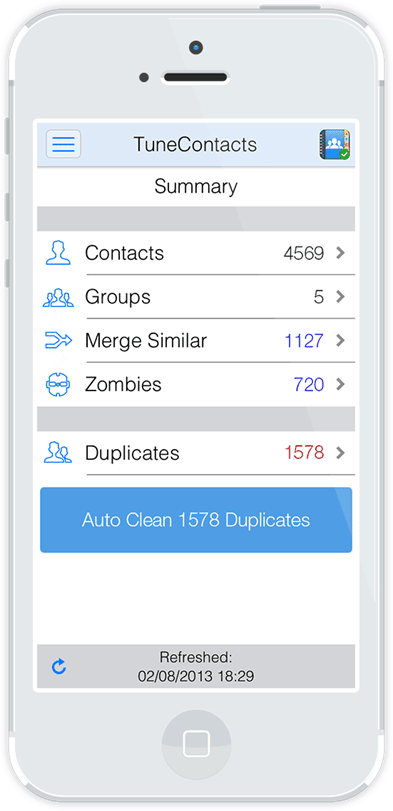 Tuneup Contacts has a minimal layout that stresses on ease-of-use rather than the aesthetics. No doubts why it is one of the lightest apps available on iTunes for trimming contact list. .
Ease-of-use
As mentioned earlier, using Tuneup contacts is as easy as it gets. The app automatically scans your iPhone’s address book to find similar and duplicate contacts, and the app enables you to mend such entries by tapping just ones.
How Tuneup Contacts trim Address Book?
It does these three things:
1. Deletes duplicate Contacts: Duplicate contacts are those that have exact field entries.
2. Merges similar ones: Suppose you have three contacts of the same person (same name). One of the entries has Name and Phone Number, the other entry has Name and email id
 And the third and the last entry has Name, Phone Number, Address, and email id.The third entry has the most number of fields, so it will be called the ‘master contact’ (see the screenshot) and the other two contacts (the first and the second) will be merged to it. So, your
contact list now has just one contact instead of three with the Name, Phone Number, Address and email id.
3. Deletes Zombies: Do you remember the example of the first sentence? Somebody gave you his email id and you saved it but only the email id and not her name. This contact will be called email zombie. Other entries such as one with just a name and devoid of any other information will become Name Zombie.
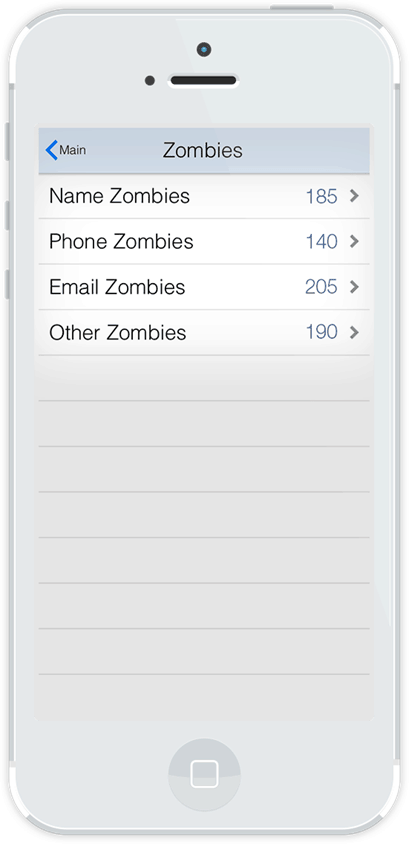 The app detects all such zombies and allows you to delete them.
Tuneup Contacts performed all the tasks superbly. I scanned my phone ones, used the auto-clean button and surprisingly, the app was good enough to sniff out all duplicate and incomplete entries.
If you are skeptical, you can individually select a category such as ‘Merge Similar’ to see the contacts listed in them and merge/delete them manually.
Is it safe to delete contacts using this app?
It is an important question indeed. The app has, thankfully, taken good care of this concern. Before editing your address book in any way, the app automatically takes full backup of the contact list so that if, in any scenario, you end up losing an important entry, you can always restore your original directory.
Also, Tuneup contacts allows you to take the backup of the existing address book of your iPhone at any time, but the backup of the original list will not be overwritten.
Conclusion
This is no need of going through your address book and weeding out contacts manually when a free app does exactly the same automatically and in a pretty safe way. Tuneup Contacts is definitely the best among the lot of apps meant for this purpose. Recommended for iPhone users!
Download Tuneup Contacts